Custom-built AI for your procurement · AI agent
Check order confirmations automatically
An AI agent reads the order confirmation from the purchasing mailbox, finds the matching purchase order in the ERP and compares line by line: price, quantity, delivery date, surcharges. If everything matches, it enters the data. If something deviates, the buyer gets a case to clarify, with the reason.
The agent runs in your Microsoft 365 with Power Automate, without a new platform and without a new login for your team.
It feels like every procurement team knows this: the confirmations come in, but nobody has the time to hold every line against the order.
Before I build, I check on your real documents whether it pays off for you.
57 SECONDS · REAL SCREENS
The same document, seen through the agent
Drag the slider. On the left is the order confirmation as it arrives, on the right the same page after the agent has read it against the order.
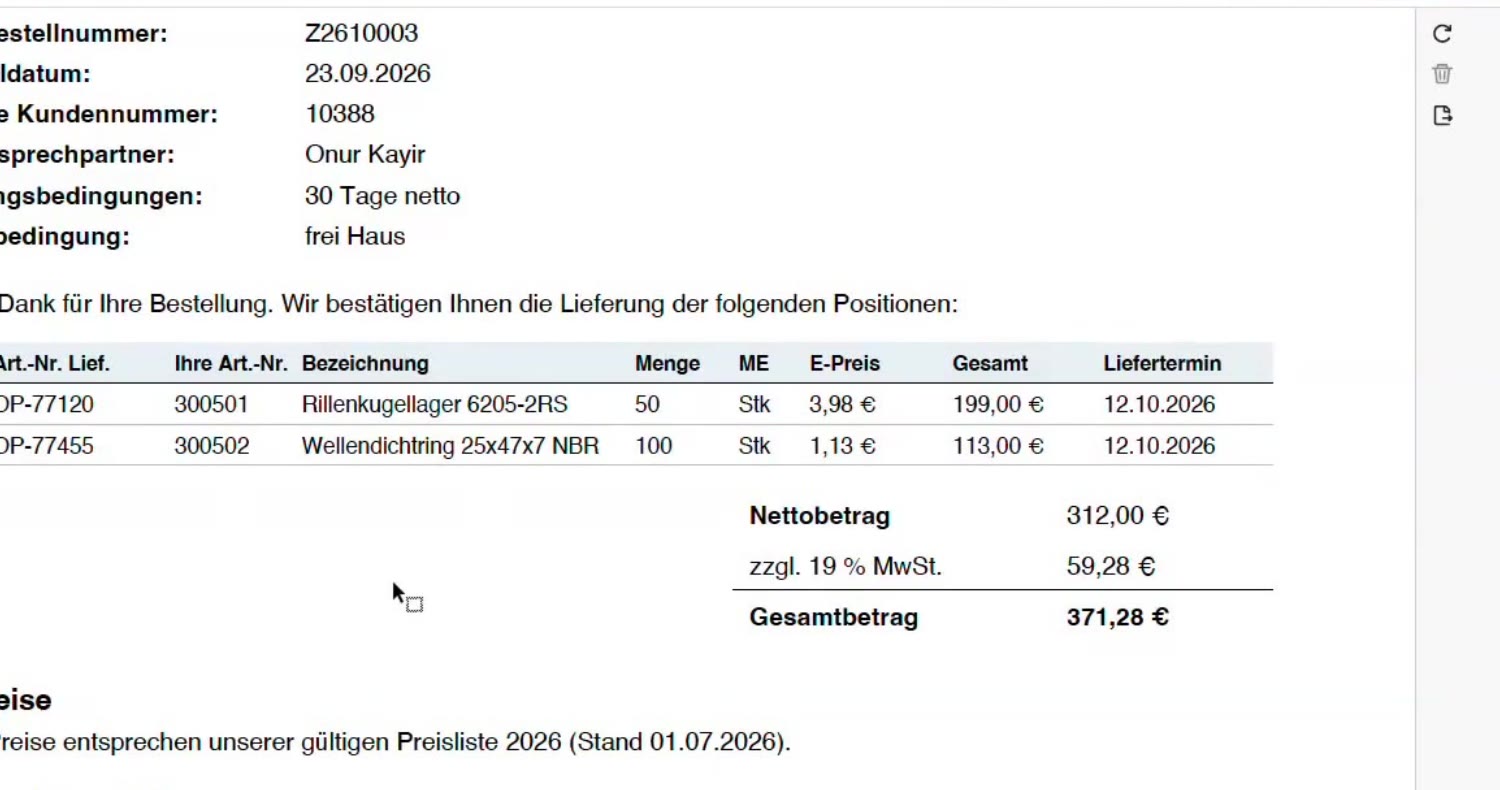 As it arrivesWhat the agent marks
How the agent checks
Recognize what arrives
The agent reads along in the purchasing mailbox. Whether an email is an order confirmation, an invoice or something else is decided by the attachment, not the subject line. If the subject says "invoice" but a confirmation is attached, it is treated as a confirmation.
Find the order
Using order number, supplier and line items, the agent finds the matching purchase order in the ERP.
Compare line by line
Price, quantity, delivery date and surcharges are checked against the order. Fixed rules run without AI. The language model only steps in when a document is unclear.
Rules per supplier
Not every supplier is checked with the same strictness. For one, the price must match the order exactly, for another the price from the confirmation is adopted. You define that, not the agent.
Enter or clarify
If everything matches, the agent enters confirmation number, confirmation date and delivery date in the ERP and files the document. If something deviates, the buyer gets a case to clarify, with the reason.
Special cases it knows
- Partial deliveries
- Amended confirmations for an order that was already confirmed
- Surcharges, for example for logistics
- Sub-items and cut-to-size parts
- Notes on plant shutdowns or company holidays
What it deliberately does not do
- It does not complain to the supplier on its own. The decision stays with the buyer.
- It does not use AI where a fixed rule is enough. That keeps the check traceable and the running costs low.
- It does not change an order without approval.
What does checking by hand cost?
Calculate with your own numbers. The defaults are assumptions, not measured values.
Manual checking per year
250 hours
11,250 €
The agent for comparison
€3,000 to €5,000 one-time, operation from €350 per month
How much of this the agent takes over for you is shown by the check on your real documents before building.
Find out in 15 minutes whether it pays offWhat it costs
An agent module costs €3,000 to €5,000 one-time. Managed operation starts at €350 per month. Before I build, I check on your real order confirmations whether the agent pays off. These prices apply if you commit by 30 November 2026.
See all prices →Frequently asked questions
Which systems does the agent need?
Microsoft 365 with Outlook and Power Automate, plus access to your ERP. Where there is no interface, we start with exports. You do not need a new platform.
Does the agent complain to the supplier itself?
No. Often a deviation is not the supplier's fault but sits in outdated order data of your own. That is why the buyer checks first, before anyone complains.
Who has access to the data?
The agent runs in your Microsoft 365 environment. Data access, approvals and operation are agreed with your IT in advance. Documentation and handover to your IT are included in the price.
What does the automatic check cost?
An agent module costs €3,000 to €5,000 one-time, managed operation from €350 per month. Before building, we check feasibility on your real documents.
Does this work during an ERP migration?
Yes. The agent works in the mailbox and in Microsoft 365, and the ERP connection is a separate module that is swapped when you change systems. So you do not have to wait for the migration.
We already have a procurement platform. Do we still need the agent?
That depends on what has remained manual work despite the platform. The agents run next to the platform and take over exactly that work, for example documents that arrive by email. Whether it pays off, I check beforehand on your real documents.
Bring three real order confirmations
In 15 minutes I will tell you whether an agent is the right tool for this, without a presentation and without a sales loop.